eSIM for Türkiye (2026): Tourist Options, Setup and Common Errors
How tourists get an eSIM for Türkiye in 2026: Turkcell's in-app tourist eSIM, Vodafone's in-store option, international data eSIMs, and fixes for setup errors.


How tourists get an eSIM for Türkiye in 2026: Turkcell's in-app tourist eSIM, Vodafone's in-store option, international data eSIMs, and fixes for setup errors.
Tourists have two kinds of eSIM for Türkiye: a Turkish operator’s tourist line, which gives you a local number, and an international data-only eSIM bought from an app. Turkcell’s tourist line is the easiest operator eSIM. You order it online, then activate it in the Turkcell app before you fly, using a chipped passport and a phone with both eSIM and NFC. The Tourist Welcome Pack costs ₺1,800 for 20 GB, 200 minutes and 100 SMS. Vodafone also offers tourist lines as an eSIM, issued in its shops. International eSIMs are data only and usually don’t come with a Turkish number. The Turkish operators’ tourist lines need your passport, and your phone must be unlocked.
Last checked: 24 September 2026, against Turkcell’s and Vodafone Türkiye’s official tourist SIM pages.
| Turkcell tourist eSIM | Vodafone tourist eSIM | International data eSIM | |
|---|---|---|---|
| Turkish phone number | Yes | Yes | Usually no |
| Set up before you fly | Yes, fully in the app | Apply online; eSIM issued in a shop | Yes |
| ID check | Passport scan + NFC + liveness check + video | Passport in shop | Varies by provider |
| Official price | ₺1,800 (20 GB, 200 min, 100 SMS) | Priced in store | Varies |
| Calls to Turkish numbers | Included minutes | Included minutes | Usually not included |
First, check your phone can use an eSIM
- eSIM support: on an iPhone, go to Settings → Mobile/Cellular → Add eSIM. On Android, look under Connections or Network & internet → SIMs. If there’s no option to add an eSIM, your phone doesn’t support it.
- Unlocked: a phone locked to your home carrier won’t accept another network’s eSIM. Ask your carrier before you travel.
- NFC, for Turkcell’s in-app activation only. It reads the chip in your passport. Most recent phones have it, but on Android it may be switched off in settings.
Option 1: Turkcell’s tourist eSIM, set up before you fly
This is the only option we’ve seen that lets you finish the whole process, including the legally required identity check, from home.
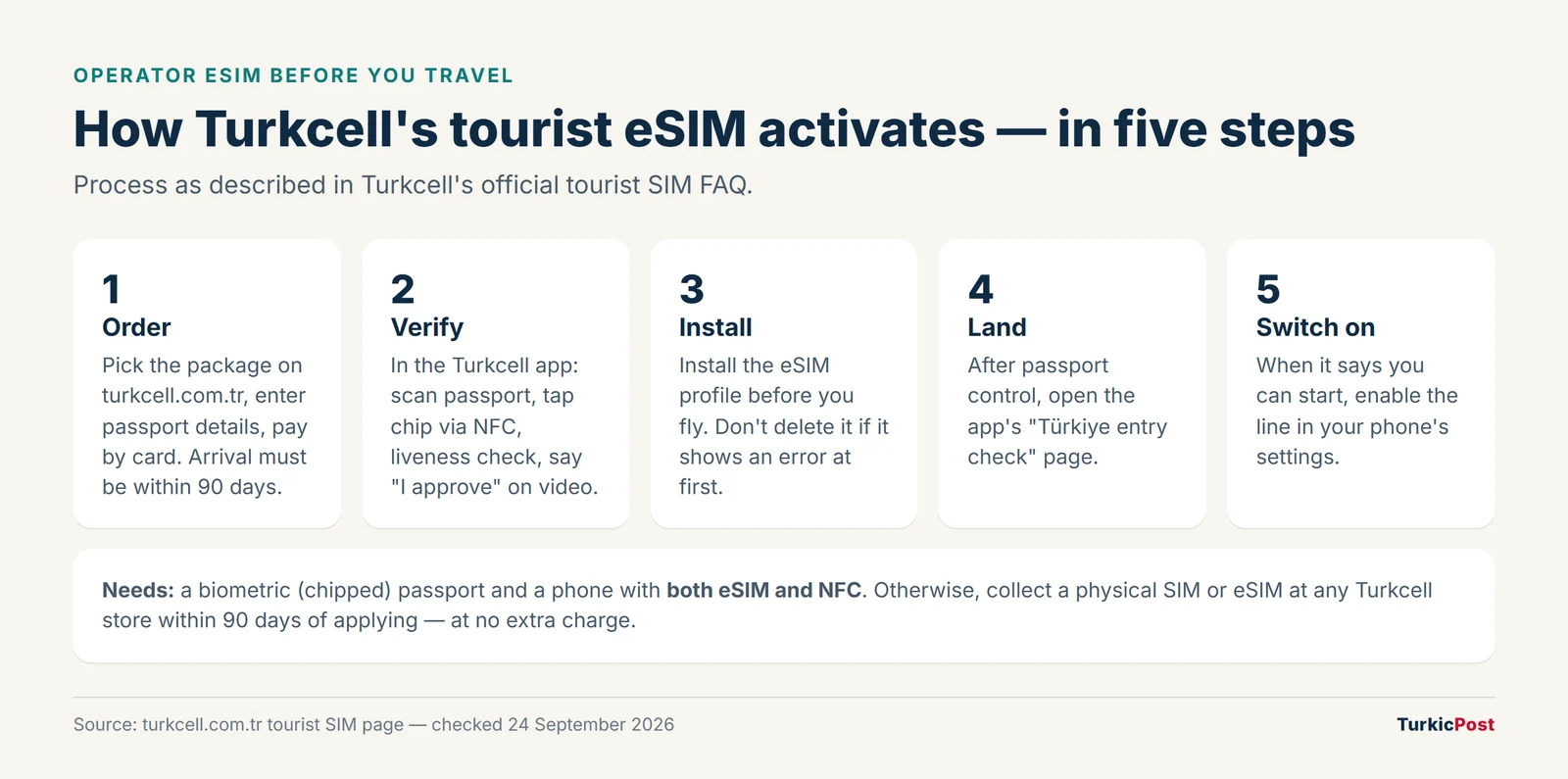
- Order online on Turkcell’s tourist page. You’ll enter your name, date of birth, nationality, passport number and arrival date. Your arrival must be within 90 days, because Turkish rules only allow tourist lines within 90 days of arrival. Verify the codes sent to your email and phone, then pay by card.
- Download the Turkcell app, choose English, tap Turkcell Tourist and log in with the contact details you gave.
- Enter the address where you’ll stay in Türkiye.
- Verify your identity: scan your passport with the camera, hold the phone over the passport’s chip until it vibrates (NFC), do the liveness check, then say “I approve” on the short video to sign the contract.
- Install the eSIM profile before you travel. On iPhones this takes two to three minutes. Don’t leave the screen while it installs.
- After passport control in Türkiye, open the app’s Türkiye entry check page. When it says you can start using your eSIM, switch the line on in your phone’s settings.
You can use the Turkish line alongside your home SIM on a dual-SIM phone. Hotspot use is allowed.
Option 2: Vodafone’s eSIM, issued in a shop
Vodafone’s tourist page lets you apply online with your name, passport number and destination city. You then collect a SIM or eSIM at any Vodafone shop, including its airport shops, where the Welcome to Turkey pack is added: 20 GB, 750 minutes, 250 SMS and unlimited WhatsApp, Telegram and Messenger. It’s a good choice if you’d rather have staff set it up, or if your passport isn’t biometric.
Option 3: an international data eSIM
Many apps sell data-only eSIMs that work in Türkiye through a local partner network. They’re quick to buy and install before you leave. Before you choose one, check:
- Which Turkish network it uses, and whether it’s 4.5G/LTE.
- Whether it includes a phone number. Most don’t. That matters if you need to call a restaurant, a driver or a hotel, or receive an SMS code in Türkiye.
- The real price per GB and the validity period. Compare it with Turkcell’s ₺1,800 for 20 GB, 200 minutes and 100 SMS.
- Hotspot rules, which some plans restrict.
When you use an international eSIM, turn data roaming on for that eSIM only. Keep roaming off on your home SIM to avoid charges.
Fixing common setup problems
These come from Turkcell’s own troubleshooting answers, and most apply to other operators too.
| Problem | What to do |
|---|---|
| Passport scan fails in the app | Scan the same passport you used to order. If the number was typed wrongly, switch to in-store activation via a store or customer service. |
| NFC won’t read the passport | Hold the phone flat over the chip area, usually in the back cover or photo page. Move slowly until it vibrates, and keep the passport still. On Android, check NFC is on. |
| Liveness check error | It fails if your face doesn’t match the chip photo closely. Activate in a store instead, or cancel through the call centre. |
| Video step won’t pass | Say the phrase “I approve” clearly. |
| eSIM “not active” after install | Normal for up to 30 minutes. Don’t delete the eSIM profile. It activates on its own. |
| “EGM Control” or entry check errors | Make sure your arrival date is correct. You can update it in the app. Otherwise go to a store. |
If in-app activation fails completely, you can still pick up the line at any Turkcell store within 90 days of ordering, at no extra charge. Turkcell’s call centre is +90 532 532 0000, with support in Turkish and English.
Keep your home number reachable
Banks and apps at home often send login codes by SMS. On a dual-SIM phone you can keep your home line active for calls and texts, with its roaming data switched off, and use the Turkish eSIM for data. Check your home carrier’s charges for receiving SMS abroad.
Staying longer than 120 days?
Phones brought from abroad work on Turkish lines for 120 days. After that they must be registered, for a fee of over ₺54,000 in 2026. The rule and your options are covered in our guide to Türkiye SIM card prices.

Getting into town with working data is much easier. Our Istanbul Airport to city centre guide compares the metro, Havaist buses and taxis.
Frequently asked questions
Can I get a Turkish eSIM before arriving?
Yes. Turkcell lets tourists order and fully activate an eSIM in its app before travelling, with a chipped passport and an eSIM- and NFC-capable phone. The line starts working after you pass passport control in Türkiye.
How much is a tourist eSIM in Türkiye?
Turkcell’s Tourist Welcome Pack costs ₺1,800 for 20 GB, 200 minutes and 100 SMS, whether you choose an eSIM or a physical SIM.
Do international eSIMs give me a Turkish phone number?
Usually not. Most are data only. If you need a local number for calls and SMS, a Turkish operator’s tourist line is the better choice.
What if my passport isn’t biometric?
You can’t use Turkcell’s in-app activation. Pick up the line in a Turkcell or Vodafone store instead, where your passport is checked in person.